You asked ChatGPT for a website. Here's how to put it online.
Last updated: 2026-10-15
Short version — save the HTML ChatGPT gave you as index.html, choose it with “Open an HTML file” under “Import my files” on makelayer.com, pick an address and publish. Free, no card, live right away.
At a glance
- Time needed
- About 1 min
- Plan required
- Free plan
- Coding knowledge
- None
- Where to do it
- “Import my files” on the home page
Step by step
- 1
Ask ChatGPT for the page
Describe the page you want and ChatGPT writes the HTML. Add “as a single HTML file” to your prompt so the styling ships in the same file — it makes the next step one paste instead of many. Then hit the copy button on the code block. That's all the preparation there is.
ChatGPT
Make a landing page for my coffee shop as a single HTML file, with a menu, a map section, and a contact button.index.html Copy<section class="hero"> <h1>…</h1></section> - 2
Save it as an HTML file and open it in MakeLayer
If your AI shows a download button, use it to get the HTML file — that's the easiest way. If not, paste the copied code into Notepad and, when saving, set “Save as type” to “All files (*.*)” and name it index.html — otherwise it saves as index.html.txt and won't show up when you pick a file. Then on the makelayer.com homepage, press “Import my files”, choose “Open an HTML file” and pick that file — the page opens in a live preview, exactly as it will look.
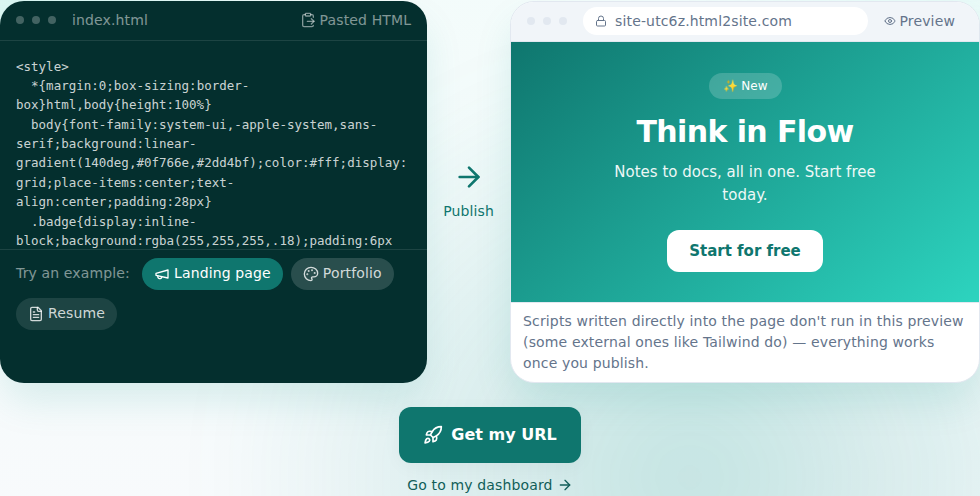
See how it really looks before you publish. - 3
Pick an address and publish
Choose a name for your address and press “Get started and publish”. Log in once and it publishes with the same file and address — your site is on the internet from that moment. The free plan covers 5 sites and never asks for a card.
myname.mklyr.com LivePublishing gives you an address like this instantly. Own a domain? Connect it on Plus and HTTPS is automatic.
- 4
Next time, edit by talking
You don't need to go back to ChatGPT for changes. In the editor, say what you want changed — the AI finds the right code, shows you the diff first, and one click reverts it if you change your mind.
Edit assistantMake the headline stronger Changed 3 spots. I can revert if you don't like it.
Frequently asked questions
Is it really free?
Yes. Up to 5 sites stay free, and we never ask for a card. Free sites carry a small “Made with MakeLayer” badge; Plus and above remove it.
Does ChatGPT's code work as-is?
Yes. The HTML file you open is published exactly as-is. In the pre-publish preview, scripts written into the page don't execute — on the published site everything runs normally.
Can I have a multi-page site?
Yes. Multiple files — sub-pages, image folders — upload on the free plan too. What the free plan limits is storage and the number of sites, not the file count. To upload a whole folder, zip it and choose “Upload a ZIP” under “Import my files” on the homepage.
Can I use my own domain?
Yes. From Plus, connect a domain you own and the HTTPS certificate is issued automatically. On the free plan you use your mklyr.com address.
Can I edit without knowing code?
Yes. Ask in plain language — “change the pricing numbers” — and the AI edits the code. You can click an element to point at it. Even on Free, your last save and one auto-backup per day you save (the latest 3) are kept, so you can roll back from “Versions.” Keeping publish and manual versions starts on the Plus plan.
Read next
- You asked Claude for a website. Here's how to put it online. Step-by-step guide to publishing Claude-generated HTML on a real address for free, no server needed (English)
- You asked Gemini for a website. Here's how to put it online. Step-by-step guide to publishing Gemini-generated HTML on a real address for free, no server needed (English)
- You already have an HTML file. Here's how to put it online. Step-by-step guide to publishing an existing HTML file on a real address for free, no server needed (English)
- Connect your own domain — two DNS records, then it's automatic How to connect a domain you own to a published site and get HTTPS issued automatically (English)
Trying it is faster than reading about it — create your site now, free.